

Prerequisites
- An active SeekOut Recruit account with MCP access for each user
- A Databricks workspace enabled for Unity Catalog in a region that supports Model Serving
- The Managed MCP Servers preview enabled by a Databricks workspace administrator
- For Genie One, the Third Party Connectors for Agents Beta enabled from the workspace Previews page
- A Databricks installer with
USE MARKETPLACE ASSETSandCREATE CONNECTIONon the Unity Catalog metastore attached to the workspace - A Unity Catalog catalog and schema where the Marketplace installation can create the MCP service
USE CATALOG,USE SCHEMA, andCREATE SERVICEon that location, plusUSE CONNECTIONon the installed connection, for the service owner- Outbound HTTPS access to
seekout-search-mcp.seekout.ioandapp.seekout.io
USE MARKETPLACE ASSETS lets the installer get or request products from Databricks Marketplace. Databricks grants it to users by default, but a metastore administrator can revoke it. CREATE CONNECTION lets the installer create the Unity Catalog connection that stores the SeekOut endpoint and OAuth configuration; installing the listing creates this connection automatically.The installer does not need an administrator role if a metastore administrator grants both privileges directly. If the listing is visible but installation is unavailable, ask your metastore administrator to grant them to the installer or an installer group:MCP service owner permissions
These permissions apply to the administrator or service owner who installs the SeekOut listing and owns the resulting MCP service:CREATE SERVICE or USE CONNECTION. To use the finished service, they need USE CATALOG, USE SCHEMA, and EXECUTE on the MCP service. Avoid granting end users USE CONNECTION, which would let them bypass the service’s tool selection, policies, and auditing. See the Databricks MCP service requirements.
Outbound network access
The Databricks-managed proxy behind the MCP service must be able to make outbound HTTPS requests on port 443 to these domains:app.seekout.io during sign-in.
This requirement is outbound-only; you do not need to expose an inbound port on the Databricks workspace. If either domain is blocked, users might see OAuth login failures, DNS or network timeouts, or a successful login followed by failed tool discovery. See Unity Catalog connections and network policies.
Choose names and a Unity Catalog location
Before setup, choose the catalog and schema that will govern the MCP service. Use your organization’s naming conventions. For example:Administrator setup
Request OAuth credentials from SeekOut
mcp:tools scope and this required OAuth resource:Handle the client secret securely
Find the public SeekOut listing
Install SeekOut from Marketplace
seekout_mcp. Confirm that the listing supplies these endpoint values:Grant access to users
USE CATALOG and USE SCHEMA on the parent objects and EXECUTE on the MCP service. Users must also be assigned to the workspace where they invoke it.Do not grant ordinary users USE CONNECTION. Reserve it for administrators and service authors so calls continue through the MCP service’s tool selection, policies, and auditing.Walkthrough
Configure and install SeekOut from the Databricks Marketplace installation dialog.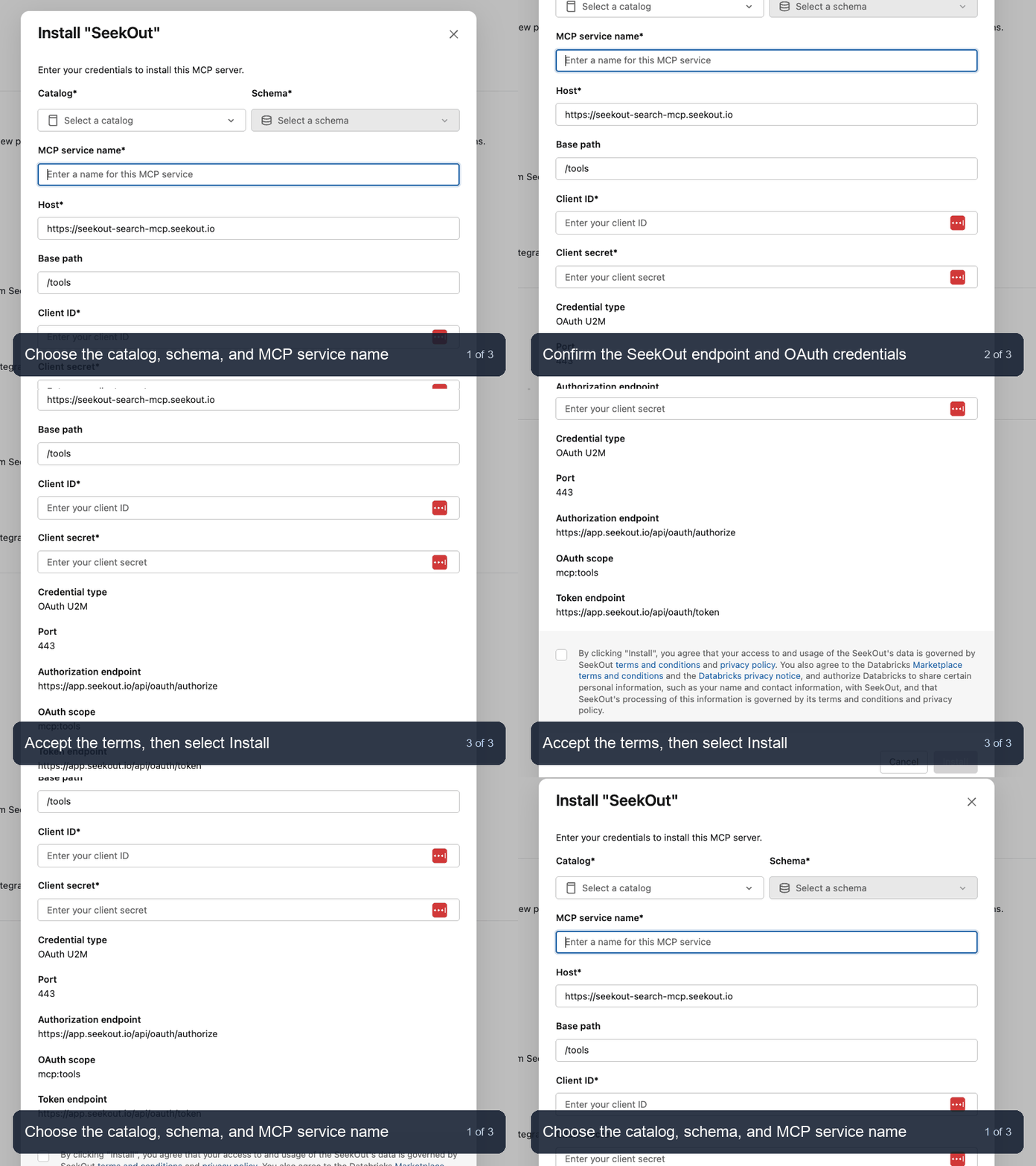
Databricks: configure and install SeekOut from Marketplace
Use SeekOut in Databricks
After the administrator completes setup and grants access, users can open SeekOut directly from Genie One or AI Playground. They do not need access to the underlying Unity Catalog connection. The first time a user accesses SeekOut, Databricks might prompt them to sign in and authorize their individual SeekOut account; OAuth tokens are not shared between users. If the sign-in prompt does not appear in Genie One or AI Playground, open Catalog, select the catalog and schema used during installation, select MCP services, and open the SeekOut MCP service. Select Login on the service detail page.- Genie One
- AI Playground
- From any Databricks workspace page, select the Switch apps grid icon in the top-right corner, then select Genie One.
- On the Genie One home page, select Ask.
- Select the plus icon beside the chat box, then select More connectors….
- On the Connectors page, turn on the SeekOut connector created by the Marketplace installation, such as
seekout-search-mcp, then return to Genie One. - Enter a prompt that explicitly asks Genie One to use SeekOut. For example:
Use SeekOut to find senior data engineers in Austin with Snowflake and Airflow experience. - If prompted, select Sign in and authorize your individual SeekOut account.
- Submit the prompt. The test succeeds when Genie One invokes a SeekOut tool and returns SeekOut-sourced results.
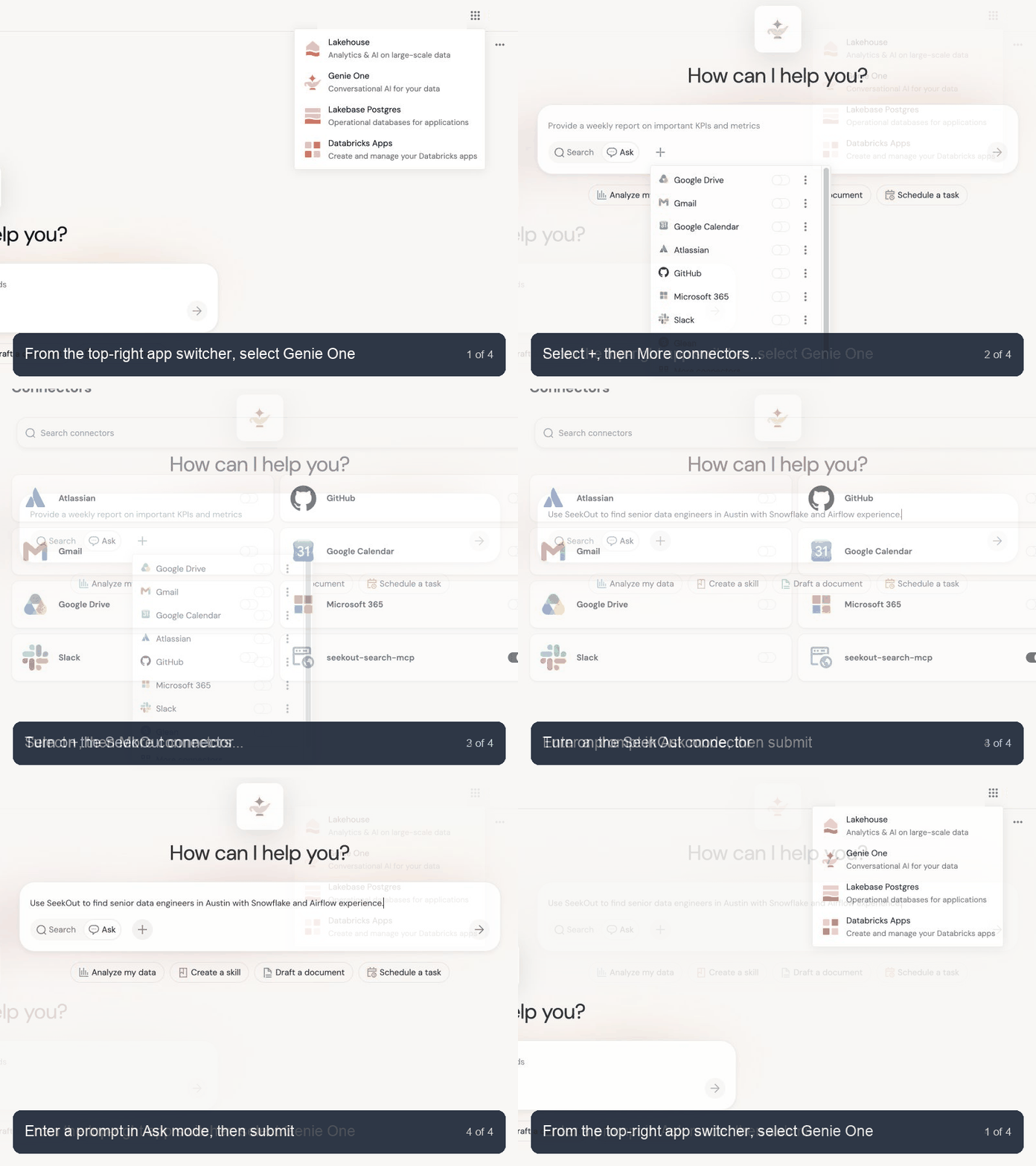
Genie One: open the app, enable SeekOut, and prepare a test prompt
Try a recruiting prompt
Use SeekOut to find senior data engineers in Austin with production Snowflake and Airflow experience. Treat fintech experience as preferred, not required.
Use SeekOut to compare the available pool of staff machine learning engineers in Seattle, Boston, and New York. Show common employers and skills, and identify which requirements narrow the pool most.
Use SeekOut to build a shortlist of five senior platform engineers with AWS, Kubernetes, and infrastructure-as-code experience. Explain the ranking and do not retrieve contacts or save candidates until I approve.
Permissions and entitlements
- Databricks controls who can install the Marketplace listing, create the connection and MCP service, and invoke the service.
- SeekOut controls the talent data, tools, actions, integrations, and credits available after a user signs in. Users cannot gain access beyond their existing SeekOut role and subscription.
- Contact retrieval, exports, and other actions can use SeekOut credits or change data. Use MCP service tool selection and Databricks policies to expose only the tools your organization approves.